Get your Callback URI
The callback URL is the URL where your Microsoft Entra Registered Application will redirect the user after the authentication process. This URL must be registered in your Registered Application.
The Callback URI
The callback URI is composed of {scheme}://{netloc}/{path}/, where the netloc is the domain name of your Django
project, and the path is /microsoft_sso/callback/. For example, if your Django project is hosted on
https://myproject.com, then the callback URL will be https://myproject.com/microsoft_sso/callback/.
So, let's break each part of this URI:
The scheme
The scheme is the protocol used to access the URL. It can be http or https. Django-Microsoft-SSO will select the
same scheme used by the URL which shows to you the login page.
For example, if you're running locally, like http://localhost:8000/accounts/login, then the callback URL scheme
will be http://.
How about a Reverse-Proxy?
If you're running Django behind a reverse-proxy, please make sure you're passing the correct
X-Forwarded-Proto header to the login request URL.
The NetLoc
The NetLoc is the domain of your Django project. It can be a dns name, or an IP address, including the Port, if
needed. Some examples are: example.com, localhost:8000, api.my-domain.com, and so on. To find the correct netloc,
Django-Microsoft-SSO will check, in that order:
- If settings contain the variable
MICROSOFT_SSO_CALLBACK_DOMAIN, it will use this value. - If Sites Framework is active, it will use the domain field for the current site.
- The netloc found in the URL which shows you the login page.
The Path
The path is the path to the callback view. It will be always /<path in urls.py>/callback/.
Remember when you add this to the urls.py?
from django.urls import include, path

urlpatterns = [
    # other urlpatterns...
    path(
        "microsoft_sso/", include(
            "django_microsoft_sso.urls",
            namespace="django_microsoft_sso"
        )
    ),
]
The path starts with the microsoft_sso/ part. If you change this to sso/ for example, your callback URL will change to
https://myproject.com/sso/callback/.
Registering the URI
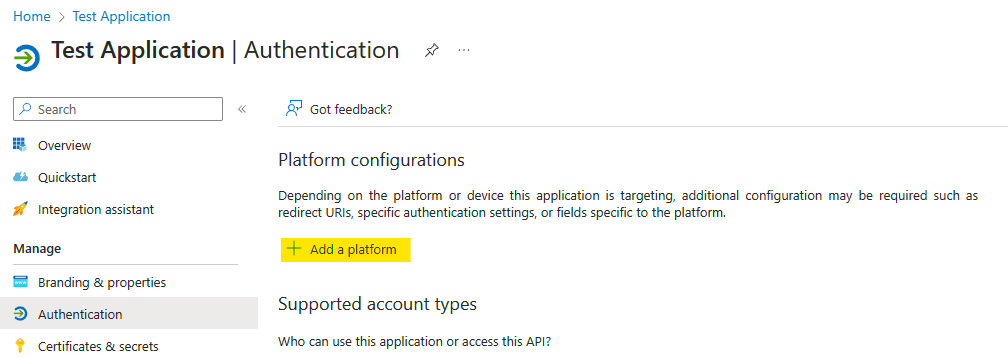
Navigate to the App registrations page, select your Registered Application and navigate to Authentication.
On Platform configurations, if you don't have any platform configured, click on Add a platform and select Web.
To register the callback URL, add the callback URL in the
Redirect URIs field, clicking on button Add URI. Then add your full URL and click on Configure.
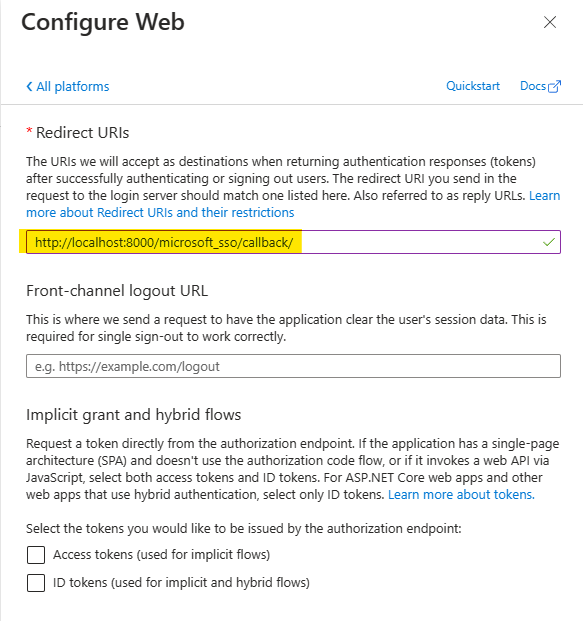
Do not forget the trailing slash
Many errors on this step are caused by forgetting the trailing slash:
- Good:
http://localhost:8000/microsoft_sso/callback/ - Bad:
http://localhost:8000/microsoft_sso/callback
Single Logout (from Microsoft)
To configure SLO (Single Logout), starting from Microsoft (logout from Microsoft first then logout from your Project) - you can optionally add Django logout URL in the Web Platform configurations. But you must inform a https address:
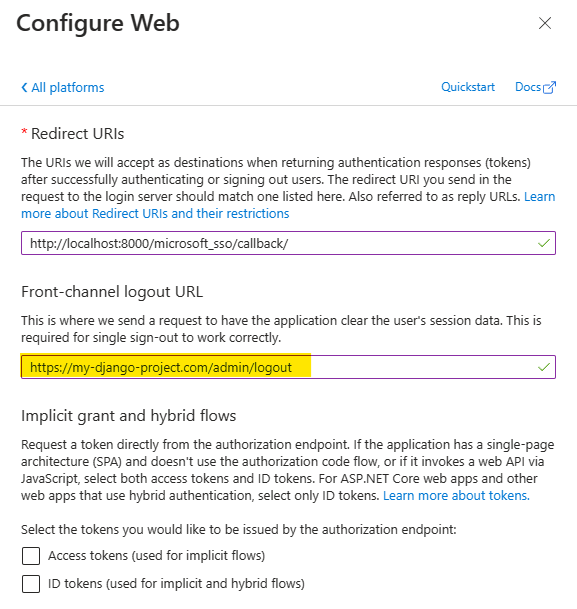
During development, use an instant ingress tunnel service for this
Ngrok is an excellent service to redirect a https connection to your local development server.
Callback response and Browser history
As stated in RFC 9700, when a browser navigates to
client.example/redirection_endpoint?code=abcd as a result of a redirect from a provider's authorization endpoint,
the URL including the authorization code may end up in the browser's history, which can be read by the client.
To avoid this, MSAL after version 1.35.0 add the form_post response mode. This means that instead of redirecting
the browser to the callback URL with query parameters, MSAL can submit a POST request to the callback URL with the
authorization code in the request body.
By default, Django-Microsoft-SSO uses the query response mode, when the redirection is done using the GET
request. This is because when we receive the redirection from a POST request, the django session is not available
in the callback view, and the next_url and state parameters are not available, unless Django Cache is configured.
To enable the secure POST callback mode, first configure Django Cache Framework
and then, set the following setting:
When secure callback is enabled, you must explicitly configure Django CACHES.
This is validated by Django system checks with code sso.E001.
Cache backend matters!
The library accepts all Django cache backends. But if you use secure callback with
LocMemCache or DummyCache, Django emits warning sso.W001 because those
backends can fail in multi-worker environments.
If these cache backends are expected in your setup, you can silence whe warning using Django's native framework:
Also, if you need to specify a different cache backend for the callback view, you can use theMICROSOFT_SSO_CALLBACK_CACHE_NAME setting:
In the next step, we will configure Django-Microsoft-SSO to auto create the Users.